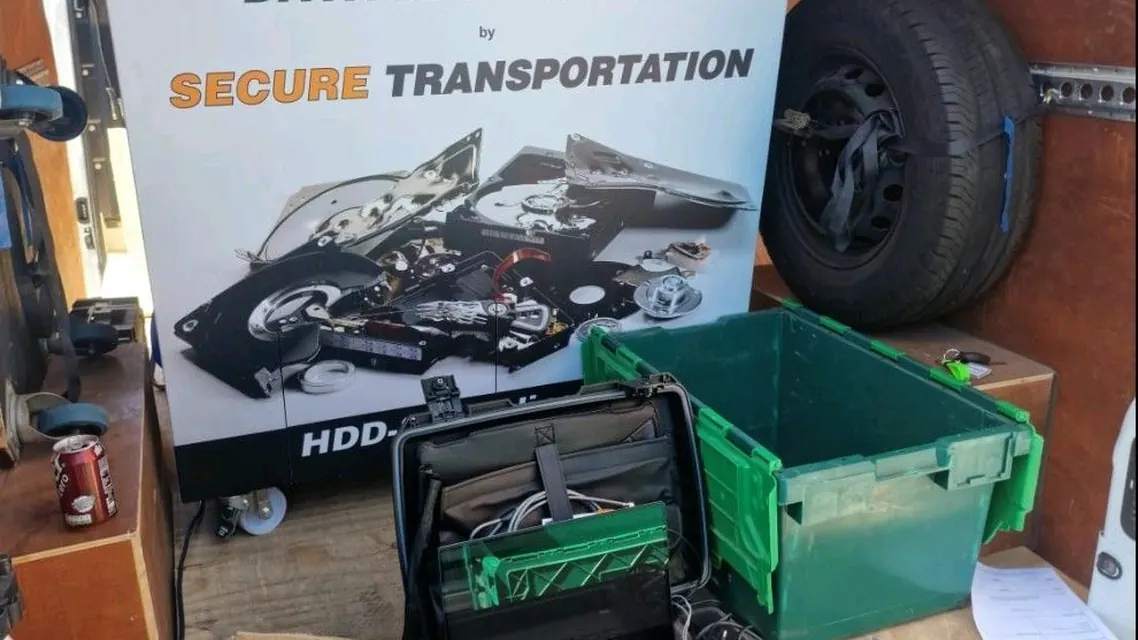
A hard drive shredder in the back of a van with a crate of drives.

How do you destroy a hard drive securely?

By Andy Pedley, Director. Updated October 12, 2026.Andy runs Secure Transportation Ltd, which has been trading since 1996 and works from Church Crookham, Fleet, Hampshire.

How to destroy a hard drive securely comes down to destroying the platters, because deleting files or reformatting leaves the data behind. Shredding is the most thorough method. Degaussing erases magnetic media, and puncturing the platters suits small numbers. Whatever you choose, get a certificate that lists the serial numbers.

When
Where
A hard drive shredder in the back of a van with a crate of drives.

Why deleting and formatting aren't enough

Deleting a file removes the pointer to it, not the data. Formatting does much the same.

Either way the data is still on the platters until something overwrites it. If a drive is leaving your control, you want it destroyed so that nobody can read it again, and you want to be able to prove it.

Five ways people try to destroy a hard drive

Each of these has a place. The question is whether it's enough for the data on the drive and whether you can prove it happened.

Hard drive destruction methods compared

  • Wiping or overwriting | What it does: Writes over the data so the drive can be used again | Good for: Drives you're going to reuse inside your own organisation | Weakness: The drive survives, so you're trusting the software and need a record for every drive. We don't offer it
  • Soaking in water | What it does: Gets the drive wet | Good for: Nothing useful | Weakness: Doesn't reliably destroy the platters or the data on them
  • DIY with a hammer or drill | What it does: Damages the casing and perhaps the platters | Good for: A single drive from home | Weakness: No record, no serial list, and you can't tell how much of a platter is intact
  • Degaussing | What it does: A strong magnetic field erases the data on magnetic drives and tapes and makes the drive unusable | Good for: Hard drives and backup tapes in volume | Weakness: Magnetic media only, so it isn't for solid state drives
  • Shredding | What it does: An industrial shredder cuts the drive into strips | Good for: Large volumes of 2.5" and 3.5" drives, and tapes, SSDs, phones and USB sticks | Weakness: Needs a shredder and a supplier who records serial numbers

Puncturing sits between degaussing and shredding: a hole through the platters means the drive can't be read, which is cheaper than shredding for a handful of drives.

What we use

We use three methods, depending on the quantity.

Shredding. An HSM Powerline StoreEx HDS 150. It destroys data carriers at security level H-3, a 40mm strip cut, and the DIN 66399 levels it covers are T-1, E-2 and H-3.

It takes drives up to 3.5" and does up to 210 an hour. It runs from a 13 amp socket or from our 7kW Hyundai dual fuel generator, so it can work in the back of one of our vehicles.

Degaussing. A Verity Systems SV91M, which has NATO approval. It erases a drive in around 12 seconds with a magnetic force of 7,000 Gauss.

It does 20 hard drives or 40 backup tapes an hour, including LTO 1 to 8. In May 2024 we used two degaussers on site to erase about 100 drives.

Puncturing. A Baileigh 3 ton arbor press that we've modified with a 2.5 inch hardened steel spike, so there's a hole through the platters. It's a bit of home engineering, and it works.

For very small quantities we degauss and puncture on site, then take the drives to our facility sealed, shred them and issue the certificate.

Tapes are the same story

Backup tapes need destroying as well. In October 2021 we lifted a fireproof safe holding 500 LTO tapes onto a truck with a truck mounted crane, and a separate 400 LTO tapes were shredded at our facility. The shredder takes magnetic tape (DLT, Ultrium and LTO), and the degausser does LTO 1 to 8.

The proof matters as much as the method

Whichever method you pick, scan in the serial numbers first and get a certificate. Our guide to the certificate of destruction for hard drives shows what a good one lists, and you can check it against your asset register with our free reconciliation sheet.

Hard drive destruction questions

Don't put them in the bin or give them to a recycler that can't show you serial numbers. Have them destroyed first, by shredding or by degaussing and puncturing, then recycled.

We do that on your site or at ours, and you get a certificate. See hard drive shredding services.

Destroy the platters. Shredding cuts the drive into 40mm strips. Degaussing erases a magnetic drive in around 12 seconds.

Puncturing puts a hole through the platters. Overwriting makes data harder to read but leaves a working drive, so it isn't destruction.

Not reliably. The platters and the data on them can survive.

Soaking also leaves you with no record of what happened. If you want the drive destroyed, shred it or degauss and puncture it.

Standards describe how thoroughly media must be sanitised. People most often ask about NIST 800-88 and the older DoD and CESG guidance. We don't claim certification to those.

What we can tell you is what our shredder does: security level H-3 on the DIN 66399 scale, with a 40mm strip cut. Ask any supplier to state their level in writing.

No. NIST 800-88 is US guidance on sanitising media, and it describes several levels from clearing to destroying. DoD data destruction usually means the old multi pass overwrite method.

Both are about making data unreadable. Neither replaces a record of what you did.

CESG was the UK government's information security arm, and its guidance on destroying media is the usual reference for UK public sector work. We don't claim compliance with it. If your organisation follows it, tell us at the quote stage and we'll talk through what you need.

Yes. Sanitisation covers any way of making data unrecoverable, and destroying the media is the most definite. Wiping is sanitisation too, but only for drives you plan to reuse.

For drives leaving your control, shredding, because it's final and easy to prove. For a handful of drives, degaussing and puncturing is cheaper.

For drives you'll reuse, wiping with a verified record. For solid state drives, tapes and phones, shredding.

DIN 66399 is the German standard that grades how small the shredded pieces must be. H-3 is the security level for hard drives. Our HSM Powerline StoreEx HDS 150 covers T-1, E-2 and H-3.

Related guides

We reply to every enquiry. Your details are used only to answer it. Privacy notice

Thank you, your enquiry has been sent

We have your details. Someone from the team will read it and come back to you by phone or email.

We reply to every enquiry. Your details are used only to answer it. Privacy notice

Thank you, your enquiry has been sent

We have your details. Someone from the team will read it and come back to you by phone or email.

CallGet a quote