
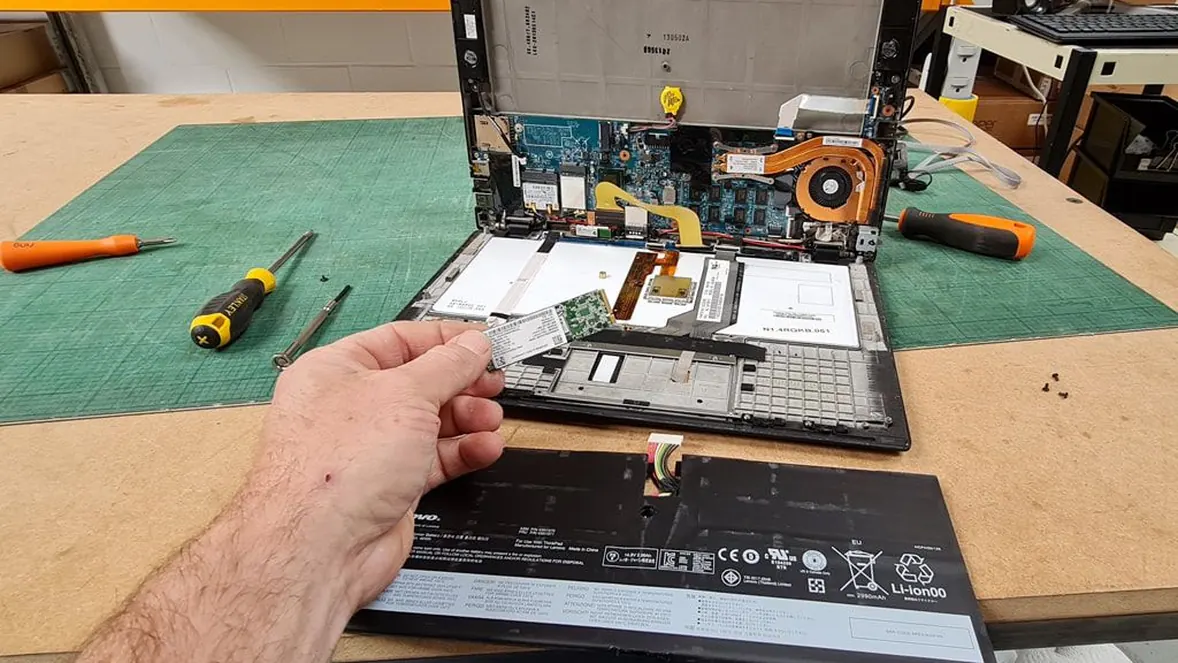



A hand removing a solid state drive from a laptop on a workbench.

What are the steps in the IT asset disposal process?

By Andy Pedley, Director. Updated October 12, 2026.Andy runs Secure Transportation Ltd, which has been trading since 1996 and works from Church Crookham, Fleet, Hampshire.

The IT asset disposal process has six steps: list every asset, remove and scan the data bearing devices, destroy the data, issue a certificate, send the equipment for reuse or WEEE recycling, and file the paperwork. We do all six, on your site or at our facility, and you get the records at the end.

When
Where
A hand removing a solid state drive from a laptop on a workbench.

What ITAD processing is

ITAD stands for IT asset disposal, sometimes called IT asset disposition. It's the practice of properly decommissioning and disposing of hardware and electronic devices, and it's part of your IT lifecycle management. It matters because old IT kit holds data, contains materials that can't go to landfill, and costs you if it goes missing.

Examples of IT assets that go through it: servers and racks, desktop PCs and laptops, monitors, network switches and routers, PDUs, tape libraries, backup tapes, hard drives and solid state drives. We've handled all of them, from 80 screens and PCs in an office to four large Juniper MX960 chassis in a data centre.

How to dispose of old IT equipment in the UK

Don't hand it to the first person who offers to take it away. A job done properly has an asset register at the start and a set of records at the end, and the data is destroyed in between. The table sets out the six steps.

The IT asset disposal process, step by step

  • 1. List | What happens: Pre-sort the equipment, compile an asset register, cross-reference it with the client's own, and remove visible asset tags | What you should get: An asset register that matches yours
  • 2. Remove and scan | What happens: Pull out the data bearing devices, hard drives and solid state drives, and capture make, model and serial number with a handheld barcode scanner | What you should get: A serial list for every drive
  • 3. Destroy | What happens: Shred the drives on site or at the facility. Degaussing and puncturing suit small quantities | What you should get: Drives that can't be read again
  • 4. Certificate | What happens: Produce the certificate of destruction listing the serial numbers | What you should get: A certificate you can check against your register
  • 5. Reuse or recycle | What happens: The rest is stored for reuse, recycled or donated. A regulated AATF partner recycles it and issues the certification. Precious metals go to approved refiners, so nothing goes to landfill | What you should get: WEEE certification
  • 6. File | What happens: Keep the asset list, serials, certificate and waste paperwork together under one reference | What you should get: A complete record for audit

Why data destruction matters

A hard drive that leaves your building still holds your data. Deleting files doesn't remove it, and a recycler who can't show you serial numbers can't show you what happened to it. Our guide to how to destroy a hard drive compares the methods.

What to put in a data destruction policy

Most data destruction policies are a template of one page or twenty. Whatever you use, it should say:

  1. Which devices are covered, from laptops to tape.
  2. Who is responsible for releasing them and who signs off.
  3. The destruction method for each type, and the standard it must meet.
  4. The records required: asset list, serial list, certificate, chain of custody.
  5. How the supplier's work is checked against your register.
  6. Where the waste goes, and the waste paperwork to keep.
  7. How long the records are kept, and where.

Our free On-Site Shredding Evidencing Pack shows the records for a shredding job, and the Sample Certificate of Destruction shows the certificate. To check one against your own list, use the reconciliation sheet. For the waste side, the WEEE and Environmental Reporting Template ties the paperwork to your asset list.

ITAD jobs we've done

  • August 2022, a telecoms client's move. IT moved to a new London office: 9 staff, 3 tail lift vehicles and 40 hot desks, with the ITAD handled back at our base.
  • August 2022, resale in Europe. Five pallets of servers and two racks decommissioned, with serial, model and origin captured for an ITAD client's resale.
  • September 2022. 16 racks, 14 pallets of servers, 6 flight cases and 2 roll cages of PDUs sorted over two days.
  • November 2021, a lease end clean sweep. Over 1,000 hard drives recovered from 50 or more desks, with the IT recycled with WEEE paperwork.
  • December 2024. Monitors removed from 160 desks and a single ultrawide installed at each, with WEEE certified disposal.

An index of the records that show IT equipment was disposed of securely and lawfully: supplier checks, asset register, chain of custody, destruction evidence and waste paperwork. Free PDF, no form.

IT asset disposal questions

It's the steps from the first asset list to the last piece of paperwork: list, remove and scan, destroy, certify, reuse or recycle, file. The table above shows each one.

ISO 27001 is an information security standard, and organisations that follow it normally expect media disposal to be controlled and recorded. We're not certified to it.

Our certification is ISO 9001:2015. What we can give you is the record: the asset list, the serial schedule and the certificate.

Personal data on old drives is still personal data. If drives leave your control with data on them, you've got a problem.

A destruction policy, drives destroyed before disposal and a certificate you can produce are the sensible answer. We're not lawyers, so take legal advice on your own obligations.

There's no single standard policy. Use the seven points in the policy section above, and add the retention rules your own legal team sets. The records are what a regulator or auditor will ask to see.

They vary by sector and by what kind of data is involved. Data protection law applies to personal data, and WEEE law applies to the equipment. Our guide to the WEEE regulations for businesses covers the equipment side.

The National Cyber Security Centre publishes guidance on securely disposing of media, and many UK organisations use it as a reference. We don't claim compliance with it. If your organisation follows it, tell us when you ask for a quote.

Because a drive that has left your control still holds your data, and you can't prove what happened to it without a record.

Deal with the data first and keep proof of it. Make a list of what you've got, destroy the drives, send the rest to a regulated AATF for recycling, and keep all the paperwork together. If you'd rather not do it yourself, we can collect it or shred the drives on your site.

Related guides

We reply to every enquiry. Your details are used only to answer it. Privacy notice

Thank you, your enquiry has been sent

We have your details. Someone from the team will read it and come back to you by phone or email.

We reply to every enquiry. Your details are used only to answer it. Privacy notice

Thank you, your enquiry has been sent

We have your details. Someone from the team will read it and come back to you by phone or email.

CallGet a quote